

If you aren't a Gold member, you don't have much space in your inbox. Every day someone responds to an ad that they don't know how to delete messages. Here's a link from the Website Help and FAQ forum. Remember, "Leave conversation" will delete it.

Here is How to delete conversations from your inbox...
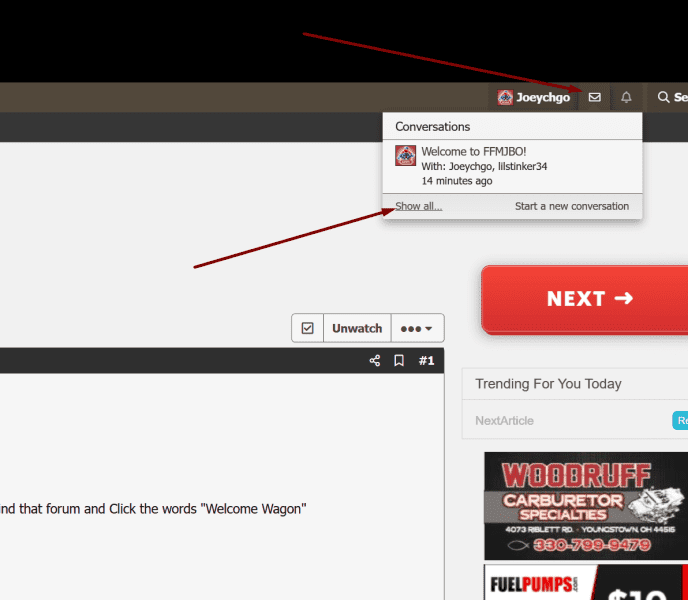
Click the envelope on the top right, then click SHOW ALL
You can also go to your conversation list and click to open one and below the title are some options.
Click on "Leave" and follow the options.
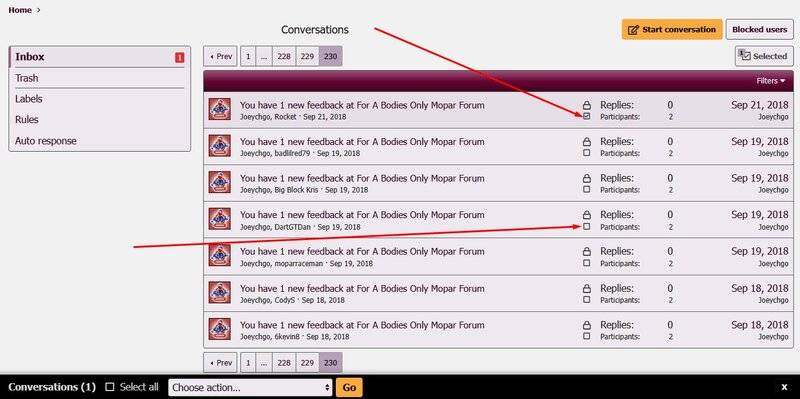
Click the check boxes of the conversations you want to delete
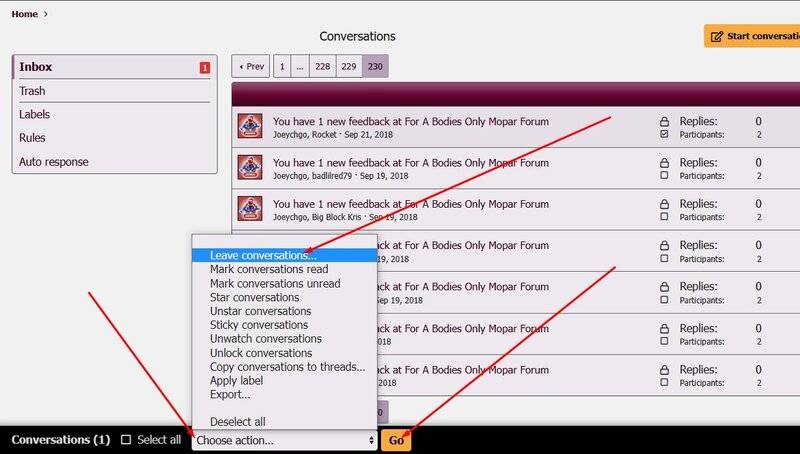
A menu will come up on the bottom of the page - Choose LEAVE CONVERSATIONS then click "GO" (that is the same thing as delete)
One more thing to do. A box will come up once you press GO asking if you want to Accept or...
Click the envelope on the top right, then click SHOW ALL
You can also go to your conversation list and click to open one and below the title are some options.
Click on "Leave" and follow the options.
Click the check boxes of the conversations you want to delete
A menu will come up on the bottom of the page - Choose LEAVE CONVERSATIONS then click "GO" (that is the same thing as delete)
One more thing to do. A box will come up once you press GO asking if you want to Accept or...
- joeychgo
- Replies: 0
- Forum: Website Help & FAQ

















