Multiple buildings trying to get internet...

-

805moparkid

Slant and AFX Guy
Joined
Oct 29, 2008
Messages
11,498
Reaction score
290
Location
Anthem AZ
ok so my boss is having some issues that he would like some help with!

currently there house and the shop (approx. 60ft away from the house) both have there own modem, obviously you can only hook one in at a time... this was fine for them until they added solar to the shop... so now the module for the solar is plugged into his modem and has to be attached at all times so it can read activity of the solar.

now in the house they have phone lines in every room that appear to run off some input/multiple output panel (see pic)...

what we are trying to figure out is how to be able to use the existing phone line for the house to go into a modem, then split off to the panel with out effecting normal phone line, and the same for the shop...

the shop is 60ft away from the house and the other computer is about 40ft from the panel... (running an ethernet cable thru the house to a router and running wi-fi in the house is kinda a last option but can be done) but the shop needs to run off that modem and have 2 ethernet plugs for the comp and solar module...

i was looking into a multiple ethernet plug in modem with wifi but it sounds like they may be adding a TV that needs internet to...

any idea's????
 

Attachments

what we are trying to figure out is how to be able to use the existing phone line for the house to go into a modem, then split off to the panel with out effecting normal phone line, and the same for the shop...

I have some knowledge of phone lines etc. Could you please elaborate on the above statement.
 
WiFi would be my first choice. We live on over an acre and my WiFi signal is strong all around the property. In fact I pick up 3 other WiFi networks in the neighborhood and we're pretty spread out.

Running cable for Internet access is so 20th century;)
 
I have some knowledge of phone lines etc. Could you please elaborate on the above statement.

well normally you plug the line from the phone jack into the modem correct. them the modem converts the "phone line" (i think CAT 5e??) into ethernet cable... but being they didn't run ether net cable to all the rooms, (just normal phone line) i was wondering if there was a way to use it from the modem to the routers or computers (which ever way works out best)

WiFi would be my first choice. We live on over an acre and my WiFi signal is strong all around the property. In fact I pick up 3 other WiFi networks in the neighborhood and we're pretty spread out.

Running cable for Internet access is so 20th century;)

what router do you have that is that strong?? i loose 2 bars just from 2 walls and 20 ft away lol...
 
Easy, get two wireless access points and set them up in bridge mode. Put a ethernet switch behind the WAP in the shop.
 
you can run a 100' ethernet cable... bury it and/or put it in conduit

or you can run wireless. if you have weak signal you can use a trick i learned.
it's called a "wave guide"

if you take a tin can, cut the ends off, put the antenna in the middle

side view:

=======
---------- <<< wireless antenna point it at the router
=======

with this type of waveguide you can attach to a wirless router up to 1 mile away. they sell them premade for $100 lol
you will need to use tape (non metal) in order to keep the antenna in the center of the tube


however, just curious, post the models of your modem(s)
do they have wireless now?
 
you can run a 100' ethernet cable... bury it and/or put it in conduit

or you can run wireless. if you have weak signal you can use a trick i learned.
it's called a "wave guide"

if you take a tin can, cut the ends off, put the antenna in the middle

side view:

=======
---------- <<< wireless antenna point it at the router
=======

with this type of waveguide you can attach to a wirless router up to 1 mile away. they sell them premade for $100 lol
you will need to use tape (non metal) in order to keep the antenna in the center of the tube


however, just curious, post the models of your modem(s)
do they have wireless now?

yea i saw some stuff for directional antenna's... interesting...

but anyways i would have to get modem numbers tomorrow... one is basic, phone in, ethernet out... the other has phone in, 4 ethernet out (which is what i wanted to use as the "hub" in the house...

any no wireless now... i was thinking about try to set it up in the shop and test it though...
 
if the bedrooms all have cat 5 ethernet, with the larger plugs (RJ45 is wider than phone lines, has 8 wires not 4) you can patch them into the router

most routers have 1 wan or internet plug and either 4 or 8 extras. the wan/internet plug is usually marked and is spaced a bit away from the others

each bedroom could plug into any of the others

like this
# ####

the first 1 is wan/internet the other 4 are bedroom plugins
 
also... if it's DSL (i'm assuming this to be the case without seeing the modem models)

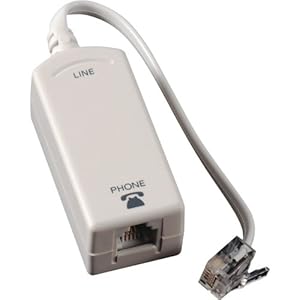
each regular phone attached to the phone lines MUST have a filter
the DSL modem must NOT have a filter

41mDU4hrswL._SL500_AA300_.jpg
 
if the bedrooms all have cat 5 ethernet, with the larger plugs (RJ45 is wider than phone lines, has 8 wires not 4) you can patch them into the router

most routers have 1 wan or internet plug and either 4 or 8 extras. the wan/internet plug is usually marked and is spaced a bit away from the others

each bedroom could plug into any of the others

like this
# ####

the first 1 is wan/internet the other 4 are bedroom plugins


so Cat 5 is the same cable at ethernet jst a different end?? and the "wan" line i was refering to as phone line
 
so Cat 5 is the same cable at ethernet jst a different end??

Yes.

It sounds to me like it would be easier to go wireless. I have a modem in my office and it works throughout the house, including upstairs.

I can take my laptop to the garage 50' away and get signal.
 
cat5/cat5e with gigabit has at least 50 times the throughput as wireless.
with 100 megabit (most routers) it's still 5 times the throughput as wireless.
however, most home internet connections are 1.5 to 3 megabit so that's the bottleneck anyways. unless you have fios in your area.
if you are sharing data between computers you would notice the difference. otherwise just use whichever you choose
 
ok well as a test i will try to turn on the wifi on the shops modem and see if i get anything on the house computer...

let you know what i find...
 

An ethernet switch and a good wireless G router should solve this. (Linksys/Cisco 300N router is a good choice for price and usability)
On a battery backup/surge protected circuit.

They have a few overpriced wireless services in that area, as well as Cox cable and DSL.
Cox cable is by far the best, but they may not need anymore speed for what they use it for.
 
If the building is a pole building with metal siding you might have an issue doing anything wireless. I can pickup my wireless signal in the garage, as long as the doors are open...
 
I just saw you are from phoenix so no you do not have comcast, try and see what cox has to offer, If I were you I would buy a DOCSIS 3 modem, The D 3.0 modem will give you min 25m down load and about 4 up which you will need becuase the distance and multiple hookups will slow things down a bit.then spend about a 150$ on a nice high speed N-router( N is a type of router) The router will have 4 plug in ports.run one to the solar modual, the get a length of CAT6 ( I believe its called cat 6 its basically cat/ eathernet cord but it is twisted and better insulated so its faster and run that into your home through conduit.from there you can either do another router or a switch( a multi port eather net splitter with no wireless capability) or do the switch in the garage and the router in the home which would probly do better. Also consider just getting a second account for the house
 
He's not hosting a **** site or anything, he just want's multiple devices to be connected over 60 foot distance.


I just saw you are from phoenix so no you do not have comcast, try and see what cox has to offer, If I were you I would buy a DOCSIS 3 modem, The D 3.0 modem will give you min 25m down load and about 4 up which you will need becuase the distance and multiple hookups will slow things down a bit.then spend about a 150$ on a nice high speed N-router( N is a type of router) The router will have 4 plug in ports.run one to the solar modual, the get a length of CAT6 ( I believe its called cat 6 its basically cat/ eathernet cord but it is twisted and better insulated so its faster and run that into your home through conduit.from there you can either do another router or a switch( a multi port eather net splitter with no wireless capability) or do the switch in the garage and the router in the home which would probly do better. Also consider just getting a second account for the house
 
Are you sure? new phoenix based mopar styled **** site?....either way
when you get cheap and lazy so does your performance
 
If the building is a pole building with metal siding you might have an issue doing anything wireless. I can pickup my wireless signal in the garage, as long as the doors are open...


steel frame with metal sides, then stucco'd...


I just saw you are from phoenix so no you do not have comcast, try and see what cox has to offer, If I were you I would buy a DOCSIS 3 modem, The D 3.0 modem will give you min 25m down load and about 4 up which you will need becuase the distance and multiple hookups will slow things down a bit.then spend about a 150$ on a nice high speed N-router( N is a type of router) The router will have 4 plug in ports.run one to the solar modual, the get a length of CAT6 ( I believe its called cat 6 its basically cat/ eathernet cord but it is twisted and better insulated so its faster and run that into your home through conduit.from there you can either do another router or a switch( a multi port eather net splitter with no wireless capability) or do the switch in the garage and the router in the home which would probly do better. Also consider just getting a second account for the house

yea they just do internet, check email and what not... youtube every so often at the most...

He's not hosting a **** site or anything, he just want's multiple devices to be connected over 60 foot distance.

exactly...
 
It's not a matter of "cheap and lazy" just common sence about what the person needs.
Not every home network needs to be a Porche.
It's supposed to be about what they need, not about how we would like to do to our own network.


Are you sure? new phoenix based mopar styled **** site?....either way
when you get cheap and lazy so does your performance
 
ok so my boss is having some issues that he would like some help with!

currently there house and the shop (approx. 60ft away from the house) both have there own modem, obviously you can only hook one in at a time... this was fine for them until they added solar to the shop... so now the module for the solar is plugged into his modem and has to be attached at all times so it can read activity of the solar.

now in the house they have phone lines in every room that appear to run off some input/multiple output panel (see pic)...

what we are trying to figure out is how to be able to use the existing phone line for the house to go into a modem, then split off to the panel with out effecting normal phone line, and the same for the shop...

the shop is 60ft away from the house and the other computer is about 40ft from the panel... (running an ethernet cable thru the house to a router and running wi-fi in the house is kinda a last option but can be done) but the shop needs to run off that modem and have 2 ethernet plugs for the comp and solar module...

i was looking into a multiple ethernet plug in modem with wifi but it sounds like they may be adding a TV that needs internet to...

any idea's????
If I understand you right you've a high speed DSL from the phone company and you want to use it to monitor the solar panels and for internet access to two computers. If this is your plan get a wireless router. It will have one input that you will connect to the DSL modem output. The wireless modem should have 4 ethernet outputs. You'll connect CAT 5E to that and run to the back of you're computer and plug that into the NIC card (network interface card) It looks like a large telephone jack. If you cannot get the ethernet cable to the computer buy a wireless card for the computer and set up a wireless link to that terminal. Follow the instructions from the wireless router. Ethernet cables have 4 pair of wires. A blue/ white pair, a orange/white pair, a green /white pair and finally a brown white pair. You cannot run dialtone through them if you're using it for data. You can buy them from computer stores in different lengths but make sure they know that it's for a network. I have a 100 ft piece here, it was cheap. You should be able to plug in the two computers and the solar panels to the wireless and still use the wireless with no problem..
 
-
Back
Top Bottom